SBP, C2B and dynamic QR
Accept SBP payments on your business website
WhiteCapital Tech helps companies accept SBP payments on their websites: create a dynamic QR code or payment link for each order and receive payment confirmation through API and notifications. Apply to have your project reviewed and agree the terms and integration flow.
Updated 7 October 2026 · Author and publisher: WHITECAPITAL PAYMENT SERVICES PROVIDER - FZCO
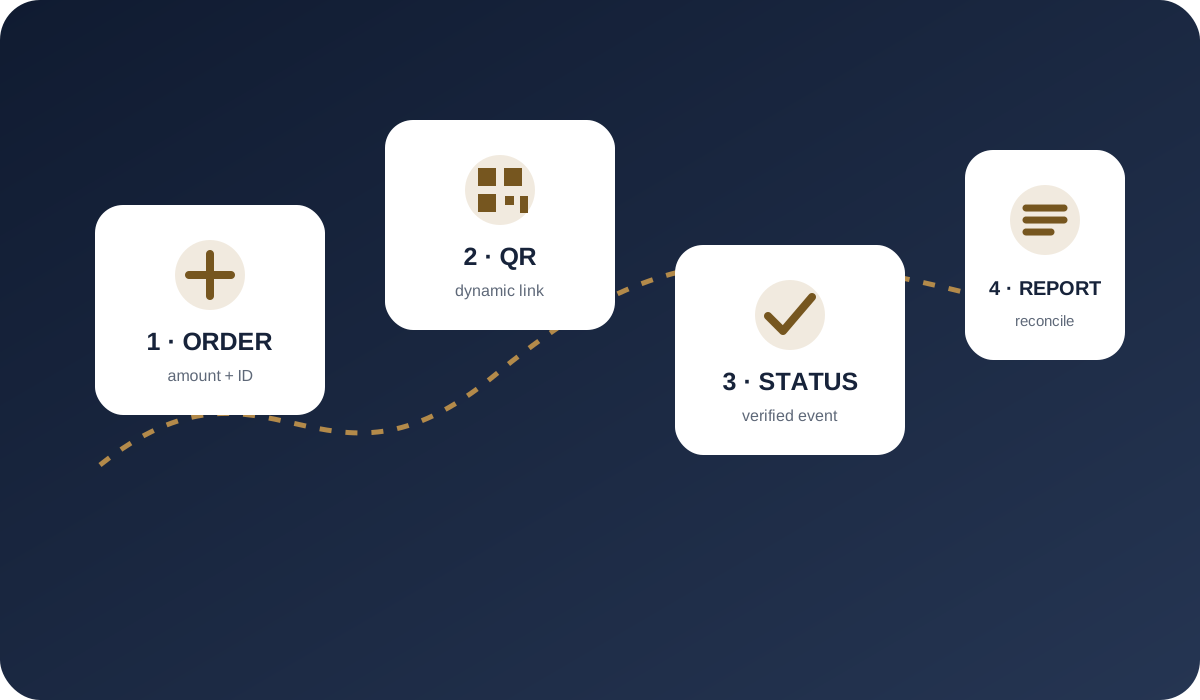
How to connect SBP to your website with WhiteCapital Tech
- Submit an application. Include your legal entity, country of registration, website, product, expected turnover and average transaction amount.
- Complete the review and agree the terms. Prepare company documents and ownership information. The payment flow, fees, limits and settlements are agreed before launch.
- Set up the integration. After project approval, receive access to the dashboard and API. Link each payment to an order, show the customer a QR code or payment link and handle the server-side status.
- Test payments and launch. Check successful payments, failures, expiry and repeated notifications. Confirm that the order and transaction register show the same result.
For developers: the step-by-step SBP integration guide and the payment API and notifications overview. If your company is registered abroad, prepare the application using the international merchant document checklist.
How an SBP payment works
The merchant creates a payment with an amount and reference. The customer opens a payment link or scans a dynamic QR code, selects a bank and confirms the payment in a banking application. Once processed, the merchant receives a status and can match the payment to the order.
Unlike a static image, a dynamic QR is generated for a specific purchase. It links the payment flow to the order parameters, making automated order accounting and result verification more practical. The available implementation is confirmed during onboarding.
- payment creation for a specific order;
- payment link or dynamic QR;
- confirmation in the customer’s banking app;
- status delivery through API, webhook or callback;
- transaction display in the dashboard and register.
SBP for websites, applications and remote sales
SBP may be placed in website checkout, a mobile application or another approved remote channel. Desktop customers can scan a QR code, while mobile customers can use a button or link to select their bank. The merchant should wait for a server-side status rather than relying only on the customer returning to the browser.
WHITECAPITAL provides the infrastructure for payment creation and status delivery. Exact interfaces, limits, refund availability and operational rules are defined in the documentation and contract for the approved project.
API notifications and payment reconciliation
A reliable integration links the merchant’s order identifier to the payment and safely handles repeated notifications. Final payment status should be confirmed server-side. Daily reconciliation should compare the merchant’s own ledger with the merchant dashboard and transaction register.
If a payment is cancelled, expires or remains unconfirmed, the order should not be marked as paid automatically. Refunds follow the agreed process and reference the original transaction.
- unique order-to-payment linkage;
- server-side status processing;
- protection against duplicate notification handling;
- logging and daily reconciliation;
- an agreed refund process.
Who can use SBP and how onboarding works
The flow may suit e-commerce, digital services, applications, education and service platforms and other companies with a clear product and transparent website. Russian or international companies may apply, but onboarding is not automatic.
Before launch, WHITECAPITAL performs KYB/KYC, website and product review, compliance screening and risk assessment. Banking setup, limits, fees, settlements and the permitted payment flow are agreed individually.
Fees and terms to compare before onboarding
Request a project-specific offer covering each available payment method, settlement and conversion costs when applicable, refund processing, reserves and payout timing. A single advertised acceptance rate does not describe all settlement conditions.
Provide your legal entity and jurisdiction, website, product, expected volume, average payment amount and settlement currency. WHITECAPITAL records the agreed terms in the contract and commercial schedule.
In-person payment acceptance through QR codes
SBP can also be used at a physical location. In an agreed WhiteCapital Tech setup, the seller creates a payment for the specific purchase amount and displays a dynamic QR code on a screen. The customer scans the code and confirms payment in their banking app.
- Create a payment for the order and obtain its QR code.
- Display the code to the customer and wait for payment confirmation.
- Check the successful transaction status in the merchant dashboard or API; the QR image and a customer screenshot do not confirm receipt of payment.
- Link the transaction to the order for reconciliation and possible refunds.
The in-person setup, hardware, cash-register integration, documents and settlement terms are agreed after business review. Learn about online and in-person payment acceptance.
Frequently asked questions
Can a physical location accept in-person payments?
Yes. An approved physical location can agree a dynamic SBP QR payment setup. The QR code is created for a specific purchase, and payment is confirmed through the transaction status in the dashboard or API. Hardware and cash-register integration are agreed separately.
What do I need to connect SBP to my website?
Apply with your company and website details, complete the review, and agree the contract and terms. Once approved, implement payment creation and server-side notifications, then test the integration.
What does onboarding and payment acceptance cost?
Terms are quoted for each project. Payment acceptance fees, settlement timing and costs, limits, refunds and any reserve are agreed before launch. Approved terms are recorded in the contract.
How long does onboarding take?
Timing depends on complete documents, company and product review, banking approval and the website’s readiness for integration. The launch schedule is confirmed after the application has been reviewed.
What is a dynamic SBP QR code?
It is a QR code generated for a specific payment so the customer can open a banking application and confirm that payment.
Can an international website accept SBP?
An international legal entity may apply. Eligibility depends on company, product and jurisdiction review and banking approval.
How does the website know that payment succeeded?
The status is delivered to the merchant dashboard and through the agreed API, webhook or callback. The server-side status should confirm the order.
Are refunds available?
Refunds may be available for approved flows under an agreed process. Exact availability and rules are set by the contract and documentation.
Primary references
For general information about SBP and Russian payment infrastructure, use official primary sources:
WHITECAPITAL
Merchant payment acceptance onboarding
SBP, QR, payment links, API and card acquiring where available — after KYB/KYC, compliance review and approval.