Short answer
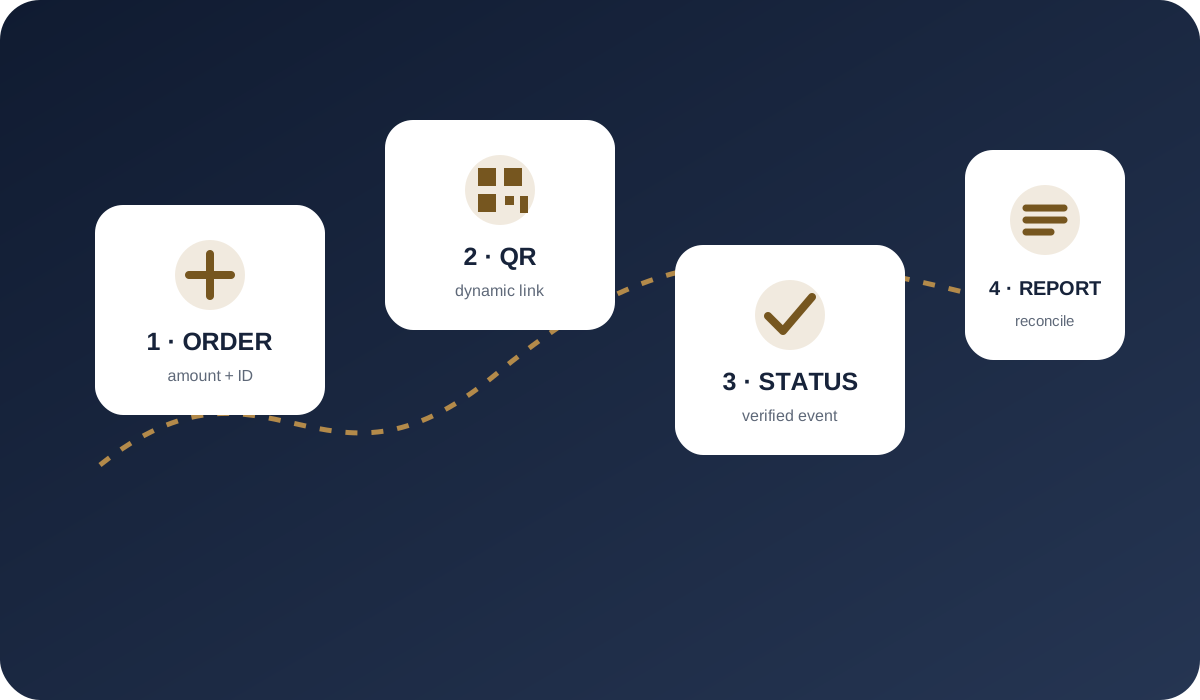
Connecting SBP requires more than displaying a QR code. A merchant needs an approved contractual setup, order-linked payment creation, verified server-side statuses, reconciliation and an agreed refund process.
- Prepare the website and company documents before integration.
- Link every payment to a specific order.
- Confirm payment from a verified server status, not browser return.
- Test both successful and negative cases before launch.
1. Prepare the website and business description
Before onboarding, the provider and banking participants need to identify the seller, understand the goods or services and review the customer refund journey. The website should clearly show the legal seller, support contacts, product description, pricing, delivery or service terms, privacy information and refund rules.
The application commonly includes corporate documents, ownership and beneficial-owner information, domains, customer geography, projected turnover and average ticket. The exact list depends on jurisdiction, product and payment structure.
- make the seller consistent across the website and application;
- remove unfinished pages and broken buttons;
- publish a clear support and refund process;
- describe traffic sources and the actual business model.
2. Select the customer journey
Desktop customers can scan a dynamic QR code. Mobile customers often use a button or payment link that opens bank selection. In either case, the payment should be created for a particular order with a defined amount and merchant reference.
Dynamic QR supports automated order-to-payment matching. Static QR is better suited to simpler offline cases and needs a separate reconciliation discipline. The final flow is agreed during onboarding.
3. Integrate the API and server notifications
The merchant server creates the payment, stores its identifier and presents the link or QR. After confirmation, the provider delivers a status through a webhook or callback. The handler should validate the notification under the documentation and prevent duplicate business actions when an event is retried.
A browser success page is not sufficient evidence because the customer may close the tab or return before the server event arrives. The verified transaction status should update the order.
- store both order and payment identifiers;
- handle notifications idempotently;
- keep API secrets out of frontend code;
- reconcile transactions against daily registers.
4. Test and launch
Before production, test successful payment, failure, expiry, repeated notification, a second attempt for the same order and refund where available. Assign operational responsibility for payment monitoring, reconciliation and customer inquiries.
WHITECAPITAL onboards approved projects after KYB/KYC, compliance review and agreement of the banking setup. Fees, limits and settlements are defined individually in the contract.
Questions and answers
Can SBP be connected by adding only a QR image?
An automated website needs payment creation, status delivery, order accounting and reconciliation. A generic QR image is usually not sufficient.
How does the website learn that payment succeeded?
Through the agreed API, webhook or callback. A verified server-side status confirms the order.
How long does onboarding take?
Timing depends on document completeness, business review, banking approval and integration readiness. No universal time can be promised before review.
Sources and policies
We use official payment-system information and WHITECAPITAL policies. Contractual documents prevail for an individual merchant setup.
- NSPK — Faster Payments System for business
- Bank of Russia — National Payment System
- WHITECAPITAL — KYC/KYB Policy
This material is for operational orientation and is not a promise of approval, universal method availability, a fixed fee or settlement timing.